Nuqs: Because URLs Should Do More
Feb 17, 2025 · 13min · originally on Medium
Move beyond local state — Go beyond, plus ultra.

Valentine's Day. I had planned it down to perfection. The right place, the right atmosphere, the right seat — because ambiance matters, and I wanted this night to be unforgettable. I took my time picking the best spot, ensuring that when we arrived, everything would be set.
The booking was seamless, no friction at all. In fact, I could have sworn it was the smoothest reservation experience I'd ever had — like a moment of rare perfection in a world of chaos. But then, the moment of truth arrived.
I stepped in, walked up confidently to my designated table… and someone else was already sitting there.
I approached the host.
"Excuse me, I had a reservation for this spot."
"Ah, yes. Unfortunately, it's already occupied."
"I don't understand. I made a reservation. Do you have my reservation?"
"Yes, we do, but the table is taken."
"But the reservation keeps the table here? That's why you have the reservation!"
"I understand, sir, but — "
"No, I don't think you do! You see, you know how to take a reservation, but you don't know how to hold the reservation. And really, the holding is the most important part of the reservation. Anybody can just take them!"
The host blinked. I sighed. My girlfriend looked at me, amused but also wondering if she should start looking up alternatives. I, on the other hand, felt like I was in a sitcom episode, living out the very definition of modern frustration.
But this isn't just about restaurants.
The Lost Spots of Everyday Life
Think about it. You've been here before, maybe not in a restaurant, but in some other equally annoying scenario.
Ever asked a friend to save you a seat in class, only to come back and find someone else sitting there, and your friend just shrugs like, "I tried, bro."?
Or maybe you've been in a long queue, patiently waiting for your turn, and then — just for a moment — you step away. Maybe to grab something, maybe just to stretch. And when you return, the person behind you has edged forward, pretending like they've been next all along. You try to reason with them, but they just stare at you blankly like, "I didn't see you there."
Or the worst — boarding a bus or train, where you find the perfect seat by the window. You drop your bag on it, step out for a second, and by the time you return, someone is already comfortably seated like they paid for the spot in blood.
These little moments of frustration add up. Because in all of them, there's one underlying expectation: something should have held your place.
But it didn't.
And if you think that's bad, let's talk about when this happens online.
The Digital Version of Losing Your Spot
You're browsing through an online store, carefully filtering for the perfect item. You've selected the color, size, and quantity. Maybe you even checked the reviews. And then — oh, a notification pops up. You leave for just a second, come back, and refresh the page.
Boom. Everything is gone.
Or maybe you're halfway through filling out a long, annoying form. You get distracted, switch tabs, and when you return — everything is wiped. The form has reset like you were never there.
Or worse, you find a great article, read halfway, and want to share it with a friend. You copy the link, send it over, but when they open it — it doesn't show what you were looking at. They're at the homepage, lost and confused, asking, "What exactly did you want me to see?"
It's like telling a friend, "Meet me at that cool café," only for them to show up at a random gas station because, for some reason, your directions didn't hold.
And this is where websites mess up.
Just like my reservation should have ensured my seat remained mine, and just like your place in a queue should be honored, URL states should preserve user context. Whether it's form inputs, filters, pagination, scroll positions, or shared links, your app should know how to hold a state, not just take it.
Because let's be honest — anybody can take them.
Fixing the Reservation Problem: URL as a State Manager
Imagine if reservations worked like URLs. Instead of relying on a fragile, easily-overwritten system, the restaurant would store all reservation details in a permanent, accessible way. No mix-ups, no surprises. Your table would be marked, and that information would persist.
This is exactly how URLs should work in web applications. A well-managed URL state ensures that user context is never lost — whether it's search filters, form inputs, pagination, or even scroll position. When a user refreshes, switches devices, or shares a link, everything should stay exactly as they left it.
So how do we fix the problem?
Instead of treating URLs as just links, we should treat them as state managers — a single source of truth that keeps track of where users are and what they're doing.
And this is where nuqs comes in.
Nuqs: Making URL State Management Effortless
One of my favorite tools to use is nuqs. I first discovered nuqs last year while revamping a project, and it instantly clicked. It felt like using useState, but for URLs.
It was seamless — like a reservation system that actually works. No weird resets, no lost state, just smooth navigation. It integrates beautifully with both server and client environments, and with the rise of SSR, it's a game-changer.
And if you're using Next.js?
Well, let's just say you've got yourself the perfect date.
So, whether it's a dinner reservation, a classroom seat, or your place in a digital space, remember this:
Taking a spot is easy. Holding it is what truly matters.
Setting Up Nuqs: Keeping Your Spot in the Digital World
A reservation system that actually works — that's what I needed. Not just for dinner, but for my apps. No more lost filters, wiped-out forms, or reset states. If I left something exactly the way I wanted it, I expected it to stay that way.
That's where Nuqs came in. But before I could fully enjoy its magic, I had to set it up properly. Just like how you don't walk into a restaurant and expect a table to set itself, you need to prepare your app to hold state effortlessly.
Step 1: Installing Nuqs
The first step was making sure Nuqs was in my project. Installing it was as easy as reserving a spot with a single click:
pnpm add nuqs
# or
npm install nuqs
# or
yarn add nuqs
With that done, I was one step closer to never losing my place again.
Step 2: Configuring Nuqs in the Root Layout
Just like a restaurant needs a reservation system in place, my app needed Nuqs to be present across all pages. The best way to do that? Wrap the entire application in a provider that ensures state persistence across routes.
In my app.tsx, I set up Nuqs like this:
import { NuqsAdapter } from 'nuqs/adapters/next/app'
import { type ReactNode } from 'react'

export default function RootLayout({
  children
}: {
  children: ReactNode
}) {
  return (
    <html>
      <body>
        <NuqsAdapter>{children}</NuqsAdapter>
      </body>
    </html>
  )
}
This was like having the maître d' of my app, making sure everything stayed exactly where it was supposed to.
And just like that, my application was ready. But what good is a reservation system if you don't use it? It was time to put Nuqs into action.
Basic Usage: The Counter That Remembers
Now, let's talk about an everyday situation where Nuqs shines.
Imagine you're counting something important — maybe reps at the gym, the number of coffees you've had today, or how many times you've reloaded Twitter. Now imagine refreshing the page and losing count. Frustrating, right?
That's where Nuqs steps in.
Take a look at this simple counter demo.
// client.tsx

'use client';

import { Button } from '@/components/ui/button';
import { Minus, Plus } from 'lucide-react';
import { parseAsInteger, useQueryState } from 'nuqs';

export default function BasicCounterDemoPage() {
  const [counter, setCounter] = useQueryState(
    'counter',
    parseAsInteger.withDefault(0)
  );

  return (
    <div className='min-h-screen flex items-center justify-center bg-gradient-to-r from-blue-50 to-indigo-50'>
      <div className='bg-white p-8 rounded-xl shadow-lg'>
        <h1 className='text-3xl font-bold text-gray-800 mb-6 text-center'>
          Interactive Counter
        </h1>
        <div className='flex flex-col items-center gap-6'>
          <span className='text-4xl font-bold text-indigo-600 tabular-nums'>
            {counter}
          </span>
          <div className='flex items-center gap-4'>
            <Button
              onClick={() => setCounter((x) => Math.max(1, x - 1))}
              className='bg-indigo-600 hover:bg-indigo-700 transition-colors'
            >
              <Minus className='w-5 h-5' />
            </Button>
            <Button
              onClick={() => setCounter((x) => x + 1)}
              className='bg-indigo-600 hover:bg-indigo-700 transition-colors'
            >
              <Plus className='w-5 h-5' />
            </Button>
          </div>
          <Button
            onClick={() => setCounter(null)}
            variant='outline'
            className='text-indigo-600 border-indigo-600 hover:bg-indigo-50'
          >
            Reset Counter
          </Button>
        </div>
      </div>
    </div>
  );
}
How It Works
- The counter state is stored in the URL as ?counter=number.
- Clicking Plus (+) or Minus (-) updates the value while keeping it in sync.
- Clicking Reset removes the state from the URL.
- Even if the user refreshes the page or shares the link, the counter value remains intact.
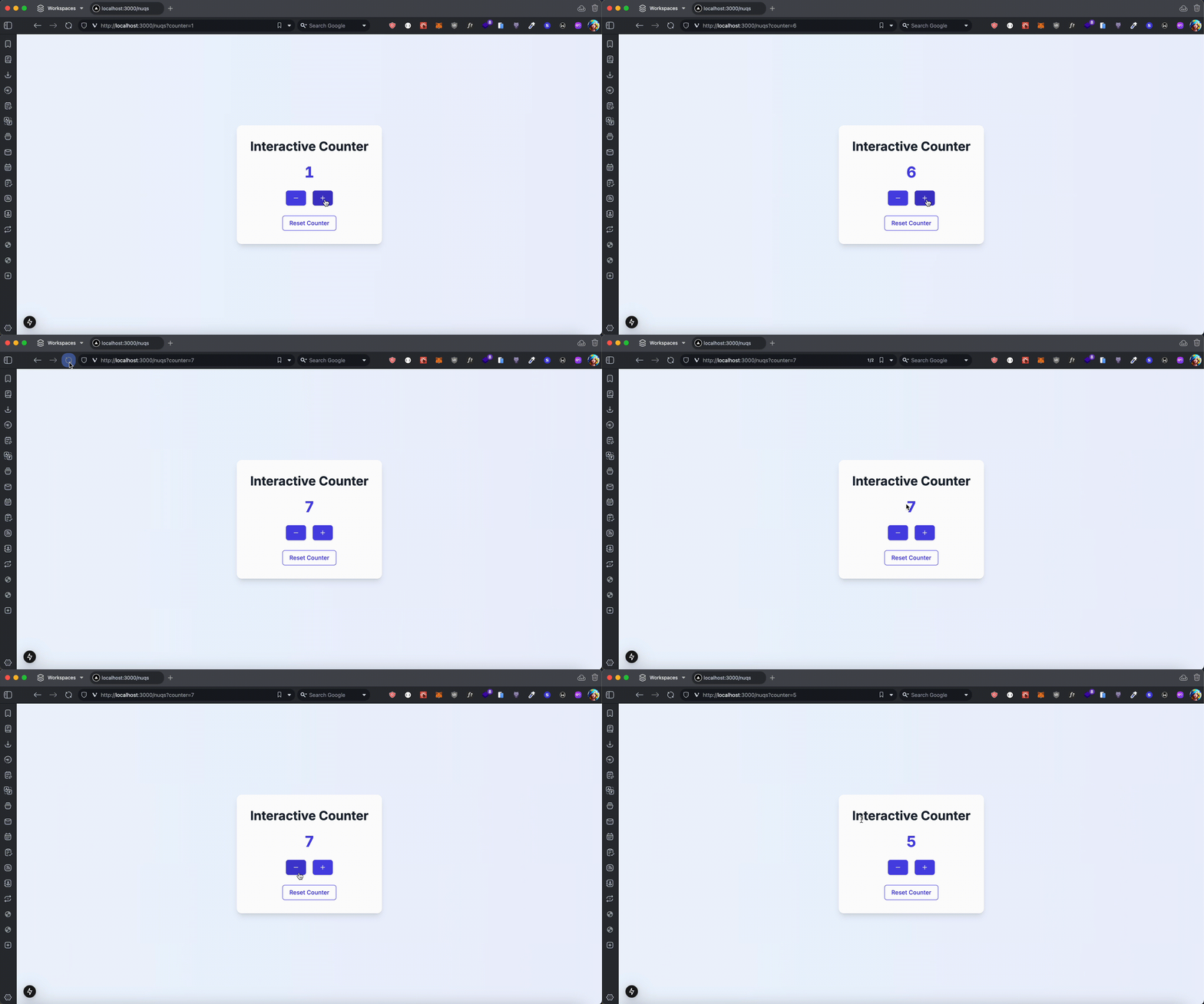 Nuqs Counter Demo
It's like saving your seat and coming back to find it exactly where you left it. No mix-ups. No "Sorry, we gave it away." Just seamless, reliable state persistence.
With Nuqs, my app wasn't just taking reservations — it was holding them. And that made all the difference.
Building a Comprehensive Table
Reserving a table is great, but what if you need a whole VIP section? In a dynamic app, handling more complex state persistence becomes crucial. That's where an advanced table setup comes in.
Advanced Tables: Where Nuqs Shines
A table is a great next step because it introduces:
- Sorting — Allow users to order data dynamically
- Filtering — Let users refine what they see
- Pagination — Efficiently manage large datasets
- State Persistence — Keep everything in sync via the URL
Setting Up the Server Action
First, let's create a server action to fetch data based on query parameters:
'use server'

import { getDatabaseResults } from '@/src/lib/db'

export async function fetchTableData({ page, sort, filter }: {
  page?: number;
  sort?: string;
  filter?: string;
}) {
  return await getDatabaseResults({ page, sort, filter });
}
Client Table Component
Now, let's create a client-side table that syncs with the URL using Nuqs:
'use client'

import { useQueryState, parseAsString, parseAsInteger } from 'nuqs'
import { fetchTableData } from '@/src/actions/tableActions'

export default function AdvancedTable() {
  const [page, setPage] = useQueryState('page', parseAsInteger.withDefault(1))
  const [sort, setSort] = useQueryState('sort', parseAsString)
  const [filter, setFilter] = useQueryState('filter', parseAsString)

  const { data, error } = use(fetchTableData({ page, sort, filter }))

  return (
    <div>
      <input
        type="text"
        placeholder="Filter..."
        value={filter ?? ''}
        onChange={(e) => setFilter(e.target.value || null)}
      />
      <button onClick={() => setSort(sort === 'asc' ? 'desc' : 'asc')}>
        Sort: {sort === 'asc' ? 'Descending' : 'Ascending'}
      </button>
      <table>
        <thead>
          <tr>
            <th>Name</th>
            <th>Value</th>
          </tr>
        </thead>
        <tbody>
          {data?.map((item) => (
            <tr key={item.id}>
              <td>{item.name}</td>
              <td>{item.value}</td>
            </tr>
          ))}
        </tbody>
      </table>
      <button onClick={() => setPage(page - 1)} disabled={page <= 1}>Previous</button>
      <button onClick={() => setPage(page + 1)}>Next</button>
    </div>
  )
}
This ensures:
- URL-based pagination, sorting, and filtering
- State persistence across refreshes and navigation
- Seamless user experience with Nuqs managing query states
Final Thoughts: Holding the Spot That Matters
At the end of the day, whether it's a table at a restaurant, a seat in a lecture hall, or your place in a digital experience, what we really want is simple: to not lose our spot.
Just like a well-managed reservation system ensures your table stays yours, a well-structured URL state ensures that users never feel lost or reset. It's not just about good UX — it's about respecting user intent.
That's where Nuqs stands out. Unlike useSearchParams, which is limited to basic query strings, or state managers like Zustand and Redux, which primarily handle in-app state (and lose it on refresh unless you introduce a persistence layer like localStorage), Nuqs ensures that state persists naturally via the URL—without extra setup.
Beyond just improving user experience, persisting state in URLs has real advantages — it makes content more SEO-friendly, allowing users to share stateful URLs effortlessly. It also enhances accessibility, ensuring users returning via bookmarks or assistive technologies don't start from scratch.
🚦 A Quick Note on Limits
Of course, even the best reservation systems have their limits — there's only so much space in a restaurant, and only so many seats in a theater. URLs are the same. While Nuqs lets you hold your spot seamlessly, every browser has a max URL length — and just like a restaurant that can't fit an entire wedding party at one table, a URL isn't the place for storing massive application state.
And just like some venues might have a "no back-to-back reservations" policy, browsers also throttle rapid URL updates to ensure smooth performance. Luckily, Nuqs handles this for you, so you don't have to worry about overloading the system.
So, as always, balance is key. Not every piece of state belongs in the URL — but when it does, Nuqs makes sure it stays there.
Because at the end of the day, the best experiences are the ones that let you leave — and come back — without losing your place.